Seventh > Sections > Product recommendations
Product Recommendations
The Product Recommendations section automatically displays product recommendations based on the current product being viewed. Perfect for showing "You may also like" or "Related products" on product pages.
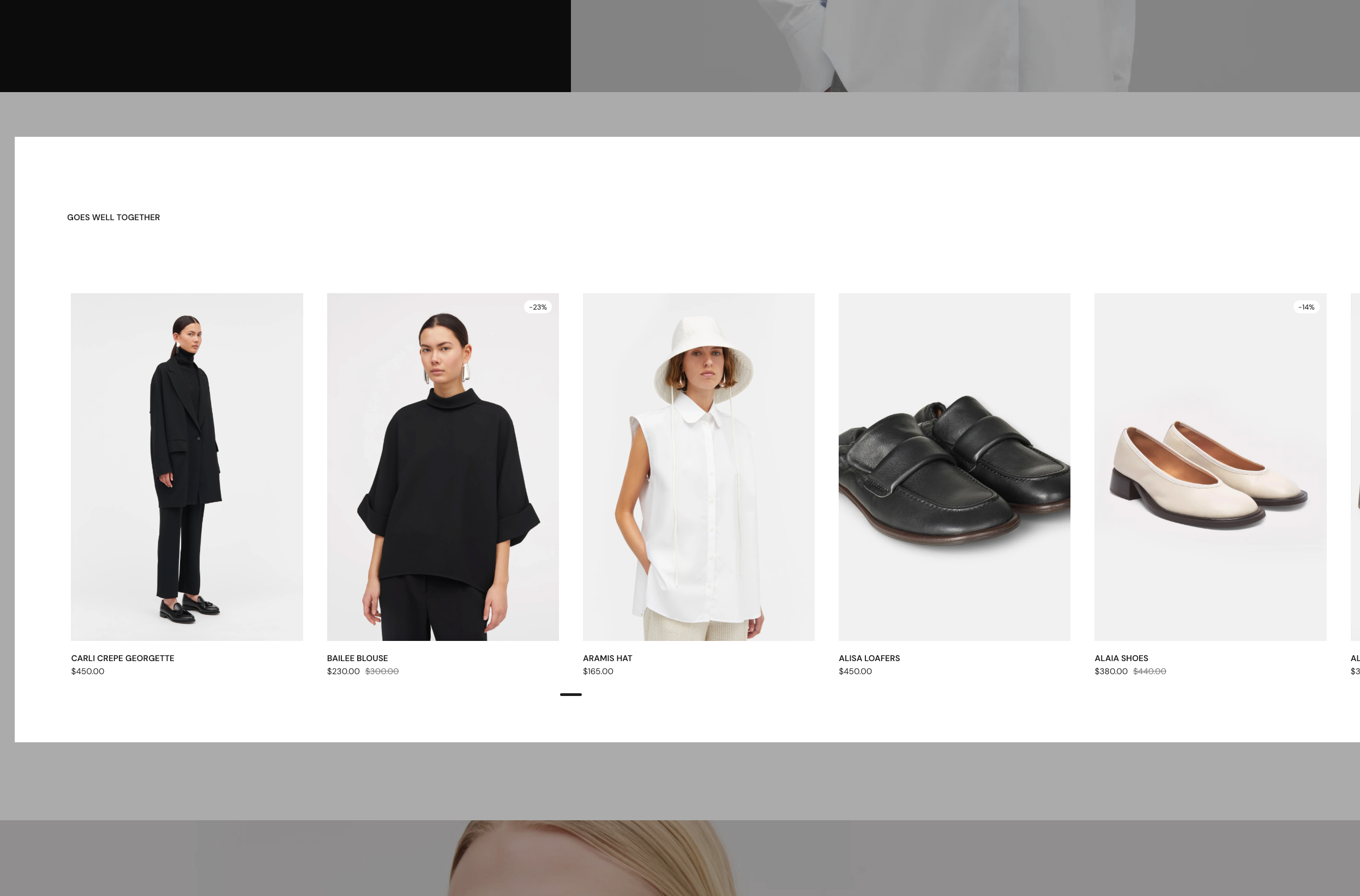
What It Does
This section automatically creates product cards for recommended products:
- Displays products recommended by Shopify based on the current product
- Recommendations appear automatically when viewing a product
- Each recommended product uses a Product Card with customizable blocks
- Products appear in a grid or slider layout
- Recommendations are powered by Shopify's recommendation engine
Section Settings Explained
Product Recommendations
Maximum Products to Show
- Controls how many recommended products to display
- Range: 1-12 products (default: 4)
- Shows the most relevant recommendations up to this limit
💡 Note: Product recommendations are powered by Shopify's recommendation engine. Recommendations may not appear immediately if Shopify hasn't generated them yet for your store.
Layout Options
Layout Controls how products are displayed:
- Grid - Standard grid layout with products in rows and columns
- Slider - Horizontal scrolling slider of products
Cards Size (Desktop) Controls how many product cards appear per row when header is at top
Cards Size (Desktop with Left Header) Controls card size when header is positioned on the left
Cards Size on Mobile Controls how many cards appear per row on mobile
Cards Alignment Controls how product cards align when they have different heights
Stretch Alignment Type (Only appears when "Stretch" is selected)
Grid Gap Controls the spacing between product cards
Cards Arrangement
Scatter Cards (Only appears when layout is "Grid")
- When enabled: Cards are arranged in a scattered, editorial-style layout
- When disabled: Cards are arranged in a uniform grid
Scatter Cards on Mobile (Only appears when "Scatter Cards" is enabled)
- When enabled: Scattered layout applies on mobile devices
- When disabled: Cards use standard grid on mobile
Horizontal Spacing (Only appears when "Scatter Cards" is enabled)
- Controls horizontal spacing between scattered cards
- Options: XSmall (0), Small (0.05), Medium (0.1), Large (0.15), XLarge (0.2)
Vertical Scattering (Only appears when "Scatter Cards" is enabled)
- Controls vertical offset/scattering of cards
- Options: XSmall (1), Small (1.5), Medium (2), Large (2.5), XLarge (3)
Gap Between Rows (Only appears when "Scatter Cards" is enabled)
- Controls spacing between rows of scattered cards
- Options: XSmall (1), Small (1.5), Medium (2), Large (2.5), XLarge (3)
Randomize Card Sizes (Only appears when layout is "Slider")
- When enabled: Cards have randomized sizes in the slider
- When disabled: All cards have uniform size
Randomize Card Sizes on Mobile (Only appears when "Randomize Card Sizes" is enabled)
- When enabled: Randomized sizes apply on mobile
- When disabled: Cards use uniform size on mobile
Section Header
Position Where the section header appears:
- Top - Header appears above the products (default)
- Left - Header appears to the left of the products
Stick to Top
- When enabled: Header stays visible when scrolling
- When disabled: Header scrolls with the page
Section Header Block The Section Header block can contain:
- Heading blocks for section titles (e.g., "You may also like")
- Text blocks for descriptions
- Button blocks for call-to-actions
- Icon blocks and other common blocks
Section Design Options
Color Scheme
- Choose from your theme's color schemes
- Applies to the entire section
Top Padding
- Controls space above the section
- Options: None, Smaller, Default, Larger, Largest
Bottom Padding
- Controls space below the section
- Options: None, Smaller, Default, Larger, Largest
Extend Section Width
- When enabled: Section extends to full browser width
- When disabled: Section stays within container width
Show Media Background
- When enabled: You can add a background image or video
- When disabled: Uses solid color background
Background Image/Video (Only appears when "Show Media Background" is enabled)
- Upload an image or video for the section background
Background Overlay (Only appears when background is set)
- Add a color overlay on top of the background
- Adjust transparency for subtle effects
Parallax Effect (Only appears when background is set)
- Adds a scrolling parallax effect to the background
- Options: None, Subtle, Medium, Strong
Push Content Down (Only appears when background is set)
- Adjusts how content sits on the background
Make Section Full Height
- Makes the section fill the entire viewport height
Product Card Options
Each recommended product uses a Product Card. You can customize what information appears on each card.
Available Product Blocks
Inside each Product Card, you can add or remove these blocks:
Product Information Blocks:
- Product Title
- Product Price
- Product Vendor
- Product SKU
- Product Description
- Product Rating
- Product Badges
Product Functionality Blocks:
- Product Variants (Standard & Compact)
- Product Thumbnail
- Product Share
- Product Inventory Availability
Product Media:
- Product Thumbnail (automatically included)
Card Styling Options
Each product card has styling options:
- Text alignment
- Padding and spacing
- Background colors or images
- Border radius
- Color schemes
Common Use Cases
Related Products
- Display on product pages
- Show 4-6 related products
- Use grid layout with 3-4 cards per row
- Add section header with "You may also like"
Upsell Products
- Show complementary products
- Display products that go well together
- Use slider layout for featured display
- Encourage additional purchases
Product Discovery
- Help customers find similar products
- Increase average order value
- Use standard grid for easy browsing
- Show products from same collection or category
Tips for Success
Recommendations
- Allow Time - Shopify needs time to generate recommendations
- Product Count - Show 4-6 products for best results
- Product Data - Ensure products have complete information
Layout
- Grid vs Slider - Use grid for browsing, slider for featured
- Card Size - 3-4 cards per row works well for product displays
- Mobile - Always preview on mobile devices
Product Cards
- Consistent Information - Show the same product blocks on each card
- Card Styling - Use consistent styling across all product cards
- Product Images - Ensure all products have quality images
Troubleshooting
Recommendations Not Showing
Problem: No recommended products appear.
Solutions:
- Wait for Generation - Shopify needs time to generate recommendations
- Product Count - Ensure you have enough products in your store
- Check Settings - Verify "Maximum Products to Show" is set correctly
- Product Data - Ensure products have complete information
Cards Look Different
Problem: Product cards have inconsistent appearance.
Solutions:
- Standardize Blocks - Show the same blocks on each card
- Use Stretch Alignment - Set cards alignment to "Stretch"
- Card Styling - Apply consistent card styling settings
Recommendations Not Relevant
Problem: Recommended products don't seem related.
Solutions:
- Shopify Algorithm - Recommendations improve over time
- Product Tags - Use consistent product tags
- Collections - Organize products into collections
Card Styling options
